Lyxvo Security docs
Connect any website to Lyxvo WAF and Lyxvo Captcha. You need a site from the dashboard: its site key (public) and secret key (keep it on your server).
Get your keysBeginner guide
Follow these steps from top to bottom. No coding knowledge needed: every click is explained, with real pictures of the dashboard. The round numbers in the pictures match the numbered steps.
Time: about 10 minutes. What you need: your website address, and access to your hosting (for WordPress) or to Cloudflare.
Words used here
- WAF (firewall)
- A guard in front of your website. Each time someone opens your site, your server asks Lyxvo "is this safe?". If it is an attack (database break-in, malicious script, hacking tool), the request is refused.
- Captcha
- The "I'm human" box in a form (contact, sign-up, login). The visitor's browser does a small calculation for about a second, so spam bots can't send the form. Visitors never pick pictures.
- Site key
- The public key, starting with lxs_pk_. Fine for anyone to see; it goes in your page with the captcha.
- Secret key
- The secret key, starting with lxs_sk_. Like a password: it goes only on your server or in Cloudflare settings. Never post it in a group chat or put it in a page.
- IP
- A visitor's internet address, like 203.0.113.7. Attackers are recognised and blocked by their IP.
- Mode
- Block attacks = refuse attacks (normal). Monitor only = log without refusing (for testing). Off = check nothing.
Steps 1–3: create your site and get its keys
1. Open the dashboard and sign in
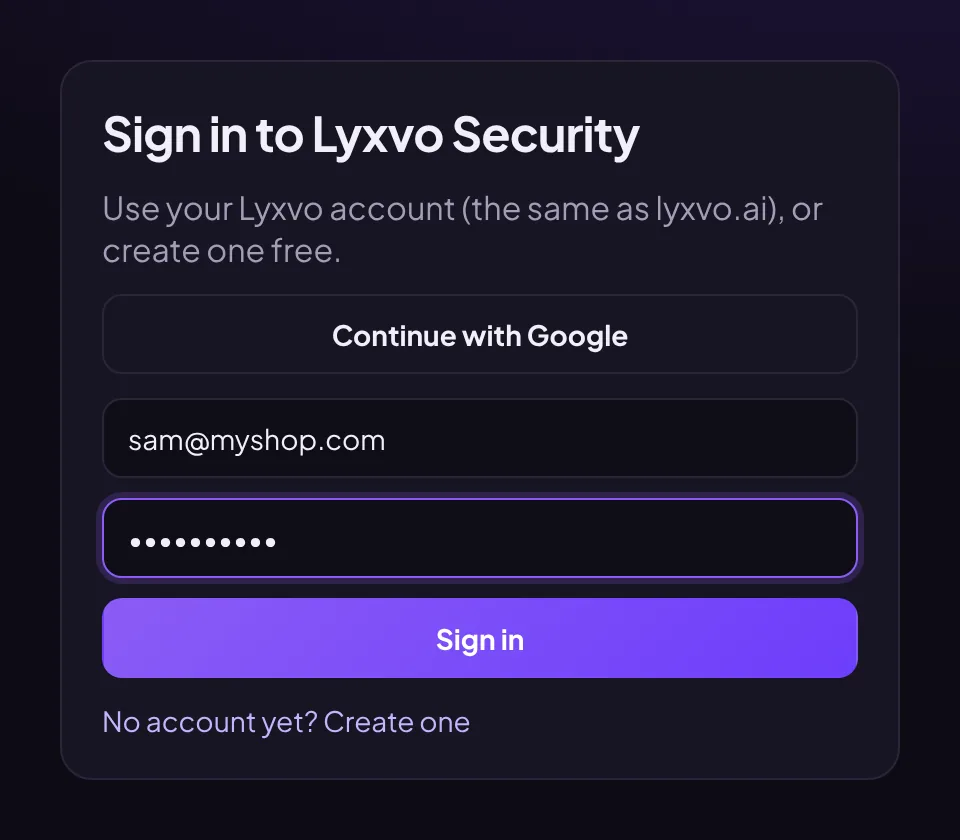
Go to security.lyxvo.ai/dashboard/. Sign in with your Lyxvo account (the same as lyxvo.ai). No account? Click "No account yet? Create one", fill in your name, email and a password (at least 8 characters), then click Create account.
2. Add your site
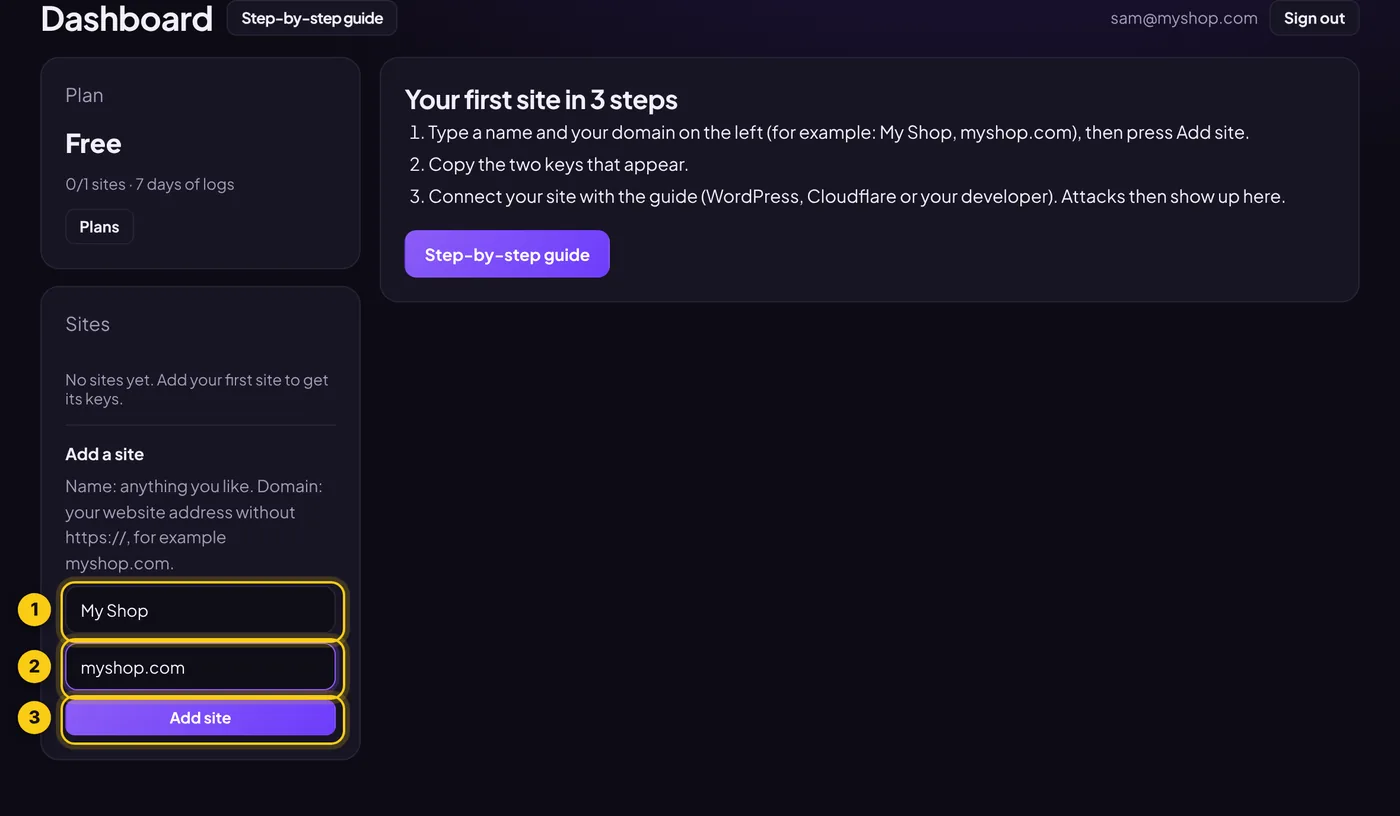
- ① Site name: anything, it's just for you. Example: My Shop.
- ② Domains: your website address without https:// and without slashes. Example: myshop.com. Subdomains (shop.myshop.com) are included. More than one? Separate them with commas.
- ③ Click Add site.
3. Copy your keys
- ① Site key: click Copy. Used for the captcha (step 5).
- ② Secret key: click Show, then Copy. Used to connect your site (step 4).
- ③ New secret: only if the secret key leaked. The old one stops working at once, so put the new one on your site.
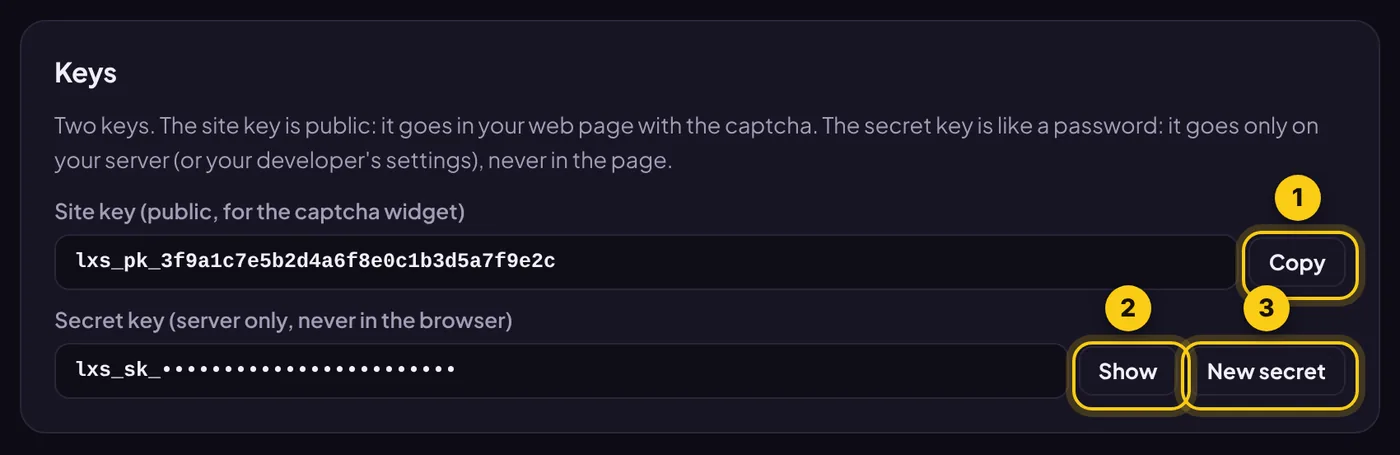
Keep the secret key somewhere safe (a private note). You can see it again any time in the dashboard.
Step 4: connect your website
Pick the way that fits. Once connected, every visitor is checked by Lyxvo first, in a split second. If Lyxvo can't be reached, your site stays open as usual.
A. WordPress
For a WordPress site on any hosting (cPanel, hPanel, Plesk…).
- Log in to your hosting panel and open the File Manager.
- Open public_html (or your site's folder), then wp-content.
- Inside wp-content, create a new folder called mu-plugins (if it isn't there yet).
- Inside mu-plugins, create a new file called lyxvo-security.php.
- Open that file (Edit) and paste all of the code below.
- Replace lxs_sk_PASTE_YOUR_SECRET_KEY_HERE with your secret key from step 3 (keep the quotes). Save.
- Back in the Lyxvo dashboard → Mode & rules → untick "Trap probes for secret files…" → Save. (WordPress really has /wp-admin, so that trap must be off.)
<?php
/* Plugin Name: Lyxvo Security */
define('LYXVO_SECRET', 'lxs_sk_PASTE_YOUR_SECRET_KEY_HERE');

function lyxvo_security_check() {
    $ch = curl_init('https://security.lyxvo.ai/api/security/check');
    curl_setopt_array($ch, [
        CURLOPT_POST => true, CURLOPT_RETURNTRANSFER => true, CURLOPT_TIMEOUT_MS => 1500,
        CURLOPT_HTTPHEADER => ['Content-Type: application/json', 'Authorization: Bearer ' . LYXVO_SECRET],
        CURLOPT_POSTFIELDS => json_encode([
            'ip' => $_SERVER['HTTP_CF_CONNECTING_IP'] ?? $_SERVER['REMOTE_ADDR'] ?? '',
            'method' => $_SERVER['REQUEST_METHOD'] ?? 'GET',
            'url' => $_SERVER['REQUEST_URI'] ?? '/',
            'headers' => function_exists('getallheaders') ? getallheaders() : [],
        ]),
    ]);
    $v = json_decode((string) curl_exec($ch), true);
    curl_close($ch);
    if (($v['action'] ?? '') === 'block') {
        http_response_code((int) ($v['status'] ?? 403));
        exit('Blocked by Lyxvo Security');
    }
}
lyxvo_security_check();
The mu-plugins folder makes the code run on its own, with nothing to activate in the Plugins menu. To remove it, delete lyxvo-security.php.
B. Cloudflare (any website)
For any site whose domain already uses Cloudflare (not Shopify or Wix).
- Go to dash.cloudflare.com → Workers & Pages → Create → Create Worker (Hello World) → name it lyxvo-security → Deploy.
- Click Edit code, delete everything, paste the code below, then click Deploy.
- Back on that Worker → Settings → Variables and Secrets → Add → type Secret, name LYXVO_SECRET, value your secret key → Deploy.
- Settings → Domains & Routes → Add → Route → enter myshop.com/* (your domain), pick your domain's zone → Add route. Repeat for www.myshop.com/* if your site uses www.
export default {
  async fetch(request, env) {
    const u = new URL(request.url);
    try {
      const r = await fetch("https://security.lyxvo.ai/api/security/check", {
        method: "POST",
        signal: AbortSignal.timeout(1500),
        headers: { "content-type": "application/json", authorization: "Bearer " + env.LYXVO_SECRET },
        body: JSON.stringify({
          ip: request.headers.get("cf-connecting-ip"), country: request.cf?.country,
          method: request.method, url: u.pathname + u.search, headers: Object.fromEntries(request.headers),
        }),
      });
      const v = await r.json();
      if (v.action === "block") return new Response("Blocked by Lyxvo Security", { status: v.status });
    } catch {}
    return fetch(request);
  },
};
This way Lyxvo guards your whole site, whatever it is built with (WordPress, Laravel, a static site…).
C. You have a developer
For a custom-built site (Laravel, Node.js, Next.js, Python, Go…).
- Send your developer the link to the "For developers" part below.
- Give them the secret key privately (not in a group chat). They put it in the server settings as LYXVO_SECRET.
- It usually takes about 15 minutes. Then do step 6 to check.
Steps 5–6: captcha and checking it works
5. Add the captcha to a form (optional)
The captcha keeps spam bots out of contact, sign-up and login forms. Paste these two lines inside your form, just before the Send button, and replace lxs_pk_… with your site key. In WordPress: use a "Custom HTML" block in the page editor. The server that receives the form must check the token (developer part: Lyxvo Captcha).
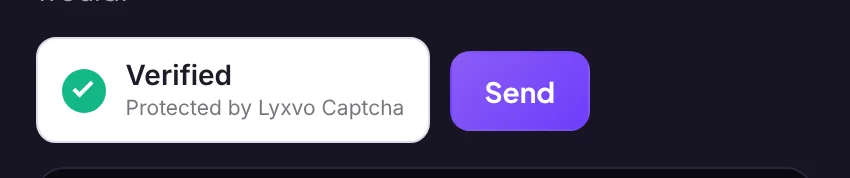
<div class="lyxvo-captcha" data-sitekey="lxs_pk_..."></div>
<script src="https://security.lyxvo.ai/captcha.js" async defer></script>
6. Check that it's connected
- In the dashboard, Mode & rules → Mode → choose "Monitor only" → Save (so you don't block yourself while testing).
- Open in your browser: https://myshop.com/?q=<script>alert(1)</script> (your domain). Your site opens as usual.
- Wait up to 15 seconds on the dashboard: ① a bar appears in the attack chart and ② a row in the Attack log with the action monitor. That means it's connected.
- Set Mode back to "Block attacks" → Save. Done, your site is protected.
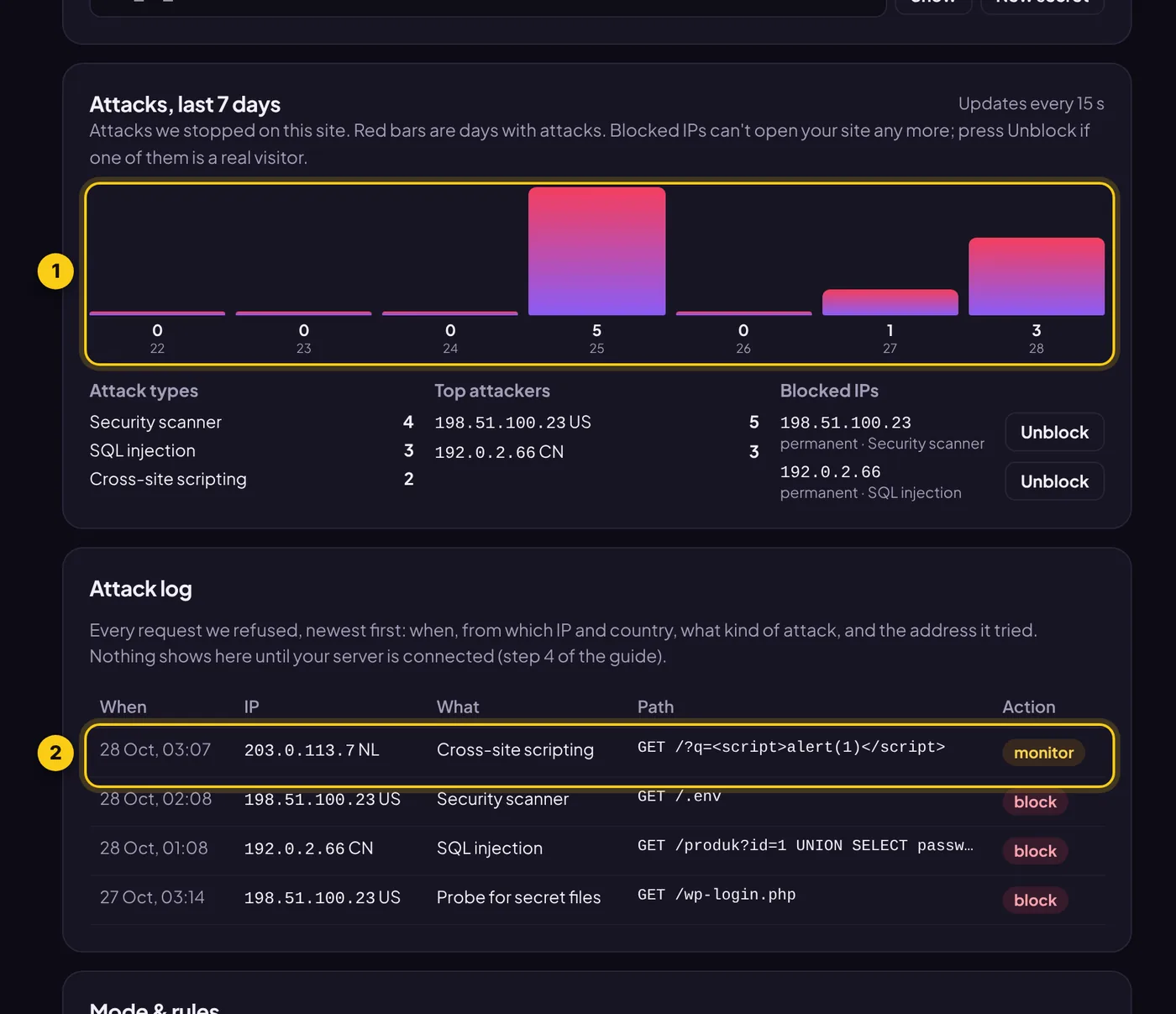
If you test in Block mode, your own IP gets blocked too. Open the dashboard → Blocked IPs → click Unblock.
Step 7: adjust to your needs
Mode & rules
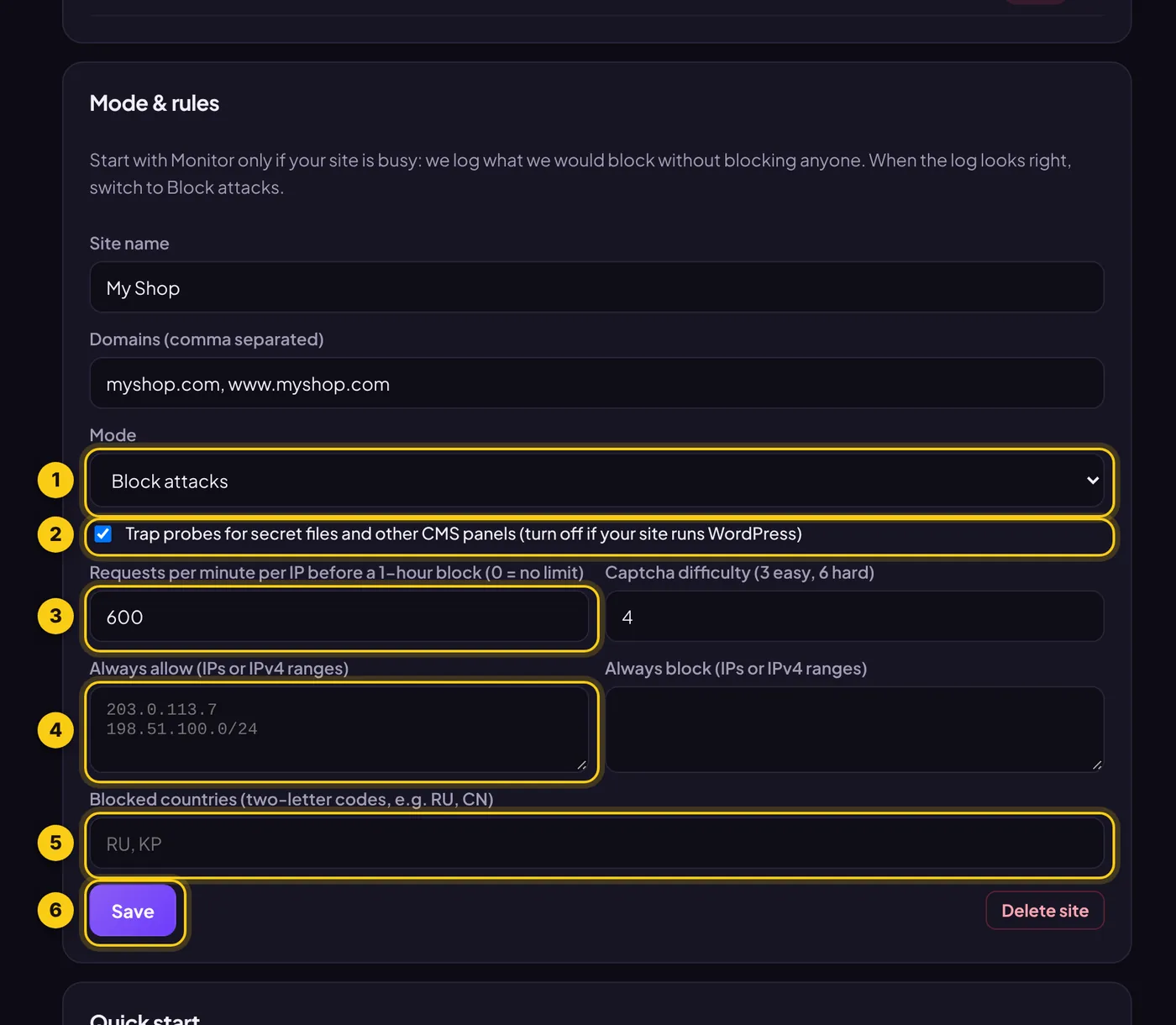
- ① Mode: Block attacks (normal), Monitor only (testing), or Off.
- ② Trap probes for secret files: keep it on, unless your site is WordPress.
- ③ Requests per minute: how often one IP may open your site per minute before a 1-hour block. 600 is safe for most sites; 0 = no limit.
- ④ Always allow: your office IP or payment provider, one per line. These IPs are never blocked.
- ⑤ Blocked countries: two-letter codes, like RU, KP. Leave empty if your visitors come from anywhere.
- ⑥ Click Save. Changes apply within seconds.
Common problems
The attack log stays empty
No attacks yet, or the site isn't connected. Check: the secret key is right (no spaces), lyxvo-security.php is in wp-content/mu-plugins, or the Cloudflare route was added. Then repeat step 6.
The captcha says "Check failed"
That page's domain isn't in your site's domain list. Add it in Mode & rules → Domains → Save, then reload the page.
A real visitor got blocked
Open Blocked IPs → Unblock. To stop it happening again, add that IP to Always allow. If it happens often, raise Requests per minute.
Can't open /wp-admin after installing
Untick "Trap probes for secret files" in Mode & rules, then unblock your IP.
A warning about this month's limit
Your plan's checks are used up. Your site keeps working but isn't checked until next month. Upgrade under Plans in the dashboard.
For developers
Technical API reference and code samples for every language.
Lyxvo WAF
Before your app handles a request, send its details to the check API. When the answer is block, refuse the request with the status it gives. Use a short timeout and let the request through on any error, so your site never depends on us.
Request
POST https://security.lyxvo.ai/api/security/check
Authorization: Bearer lxs_sk_...
Content-Type: application/json

{ "ip": "203.0.113.7", "method": "POST", "url": "/login?next=/",
"headers": { "user-agent": "Mozilla/5.0 ..." }, "body": "email=a%40b.com", "country": "ID" }ip- The visitor's IP (behind a proxy: X-Forwarded-For or CF-Connecting-IP).
method, url- The HTTP method and the path with its query string.
headers- The request headers (User-Agent and scanner headers are checked).
body- Optional. Form or JSON body, up to 64 KB, scanned for payloads.
country- Optional two-letter country, for blocked countries (sent by Cloudflare as CF-IPCountry).
Answer
{ "action": "block", "status": 403, "kind": "sqli", "reason": "union select" }
{ "action": "allow", "status": 200 }action- allow or block.
status- 403 for attacks, 429 for floods and temporary blocks.
kind- The attack found: sqli, xss, traversal, rce, scanner, trap, flood…
monitor- true when the site is in monitor mode: logged, not blocked.
quota- true when this month's checks are used up (the request is allowed).
Examples
Node.js / Express
// npm i express  ·  set LYXVO_SECRET=lxs_sk_... in your environment
app.set("trust proxy", true); // so req.ip is the visitor, behind a proxy or load balancer
app.use(async (req, res, next) => {
  try {
    const r = await fetch("https://security.lyxvo.ai/api/security/check", {
      method: "POST",
      signal: AbortSignal.timeout(1500),
      headers: { "content-type": "application/json", authorization: "Bearer " + process.env.LYXVO_SECRET },
      body: JSON.stringify({ ip: req.ip, method: req.method, url: req.originalUrl, headers: req.headers,
        body: typeof req.body === "string" ? req.body : JSON.stringify(req.body || "") }),
    });
    const v = await r.json();
    if (v.action === "block") return res.status(v.status).send("Blocked by Lyxvo Security");
  } catch {} // Lyxvo Security unreachable: let the request through
  next();
});
Next.js (proxy.ts / middleware.ts)
// proxy.ts (Next.js 16) or middleware.ts (older), at the project root
import { NextResponse, type NextRequest } from "next/server";

export async function proxy(req: NextRequest) {
  try {
    const r = await fetch("https://security.lyxvo.ai/api/security/check", {
      method: "POST",
      signal: AbortSignal.timeout(1500),
      headers: { "content-type": "application/json", authorization: "Bearer " + process.env.LYXVO_SECRET },
      body: JSON.stringify({
        ip: req.headers.get("x-forwarded-for")?.split(",")[0].trim() || "",
        method: req.method, url: req.nextUrl.pathname + req.nextUrl.search,
        headers: Object.fromEntries(req.headers),
      }),
    });
    const v = await r.json();
    if (v.action === "block") return new NextResponse("Blocked by Lyxvo Security", { status: v.status });
  } catch {}
  return NextResponse.next();
}
export const config = { matcher: ["/((?!_next/static|_next/image|favicon.ico).*)"] };
PHP / Laravel / WordPress
<?php
// Plain PHP: include at the top of index.php. WordPress: save as wp-content/mu-plugins/lyxvo-security.php
// (turn off "Trap probes" in the dashboard, since WordPress really has /wp-admin). Laravel: put the body in a middleware.
function lyxvo_security_check(): void {
    $secret = getenv('LYXVO_SECRET') ?: 'lxs_sk_...';
    $headers = function_exists('getallheaders') ? getallheaders() : [];
    $payload = json_encode([
        'ip' => $_SERVER['HTTP_CF_CONNECTING_IP'] ?? $_SERVER['REMOTE_ADDR'] ?? '',
        'method' => $_SERVER['REQUEST_METHOD'] ?? 'GET',
        'url' => $_SERVER['REQUEST_URI'] ?? '/',
        'headers' => $headers,
        'body' => substr(file_get_contents('php://input') ?: '', 0, 8000),
    ]);
    $ch = curl_init('https://security.lyxvo.ai/api/security/check');
    curl_setopt_array($ch, [
        CURLOPT_POST => true, CURLOPT_RETURNTRANSFER => true, CURLOPT_TIMEOUT_MS => 1500,
        CURLOPT_HTTPHEADER => ['Content-Type: application/json', 'Authorization: Bearer ' . $secret],
        CURLOPT_POSTFIELDS => $payload,
    ]);
    $v = json_decode((string) curl_exec($ch), true);
    curl_close($ch);
    if (($v['action'] ?? '') === 'block') { // anything else, including a timeout, lets the request through
        http_response_code((int) ($v['status'] ?? 403));
        exit('Blocked by Lyxvo Security');
    }
}
lyxvo_security_check();
Python (Flask / Django)
# pip install requests  ·  Flask shown; in Django do the same in a middleware's __call__
import os, requests
from flask import Flask, request, abort

app = Flask(__name__)

@app.before_request
def lyxvo_security():
    try:
        v = requests.post("https://security.lyxvo.ai/api/security/check", timeout=1.5,
            headers={"Authorization": "Bearer " + os.environ["LYXVO_SECRET"]},
            json={"ip": request.headers.get("X-Forwarded-For", request.remote_addr).split(",")[0].strip(),
                  "method": request.method, "url": request.full_path, "headers": dict(request.headers),
                  "body": request.get_data(as_text=True)[:8000]}).json()
        if v.get("action") == "block":
            abort(v.get("status", 403))
    except requests.RequestException:
        pass  # fail open
Go (net/http)
func LyxvoSecurity(next http.Handler) http.Handler {
	client := &http.Client{Timeout: 1500 * time.Millisecond}
	return http.HandlerFunc(func(w http.ResponseWriter, r *http.Request) {
		h := map[string]string{}
		for k, v := range r.Header { h[k] = strings.Join(v, ", ") }
		ip, _, _ := net.SplitHostPort(r.RemoteAddr)
		body, _ := json.Marshal(map[string]any{"ip": ip, "method": r.Method, "url": r.URL.RequestURI(), "headers": h})
		req, _ := http.NewRequest("POST", "https://security.lyxvo.ai/api/security/check", bytes.NewReader(body))
		req.Header.Set("Content-Type", "application/json")
		req.Header.Set("Authorization", "Bearer "+os.Getenv("LYXVO_SECRET"))
		if res, err := client.Do(req); err == nil {
			var v struct{ Action string; Status int }
			json.NewDecoder(res.Body).Decode(&v)
			res.Body.Close()
			if v.Action == "block" { http.Error(w, "Blocked by Lyxvo Security", v.Status); return }
		}
		next.ServeHTTP(w, r)
	})
}
Cloudflare Workers (in front of any site)
// A Worker on your domain's route screens every request, then passes it to your origin.
// Secret: wrangler secret put LYXVO_SECRET
export default {
  async fetch(request, env, ctx) {
    const u = new URL(request.url);
    try {
      const r = await fetch("https://security.lyxvo.ai/api/security/check", {
        method: "POST",
        signal: AbortSignal.timeout(1500),
        headers: { "content-type": "application/json", authorization: "Bearer " + env.LYXVO_SECRET },
        body: JSON.stringify({
          ip: request.headers.get("cf-connecting-ip"), country: request.cf?.country,
          method: request.method, url: u.pathname + u.search, headers: Object.fromEntries(request.headers),
        }),
      });
      const v = await r.json();
      if (v.action === "block") return new Response("Blocked by Lyxvo Security", { status: v.status });
    } catch {}
    return fetch(request);
  },
};
Lyxvo Captcha
The widget gets a challenge, the visitor's browser solves a small proof-of-work (about a second, no puzzle), and a token goes into the hidden field lyxvo-captcha. Your server sends the token with your secret key to the verify API. A token works once and for 5 minutes. The widget only runs on the domains of the site.
1. In your form (any page)
<form action="/contact" method="POST">
  <input name="email" type="email" required>
  <div class="lyxvo-captcha" data-sitekey="lxs_pk_..."></div>
  <button>Send</button>
</form>
<script src="https://security.lyxvo.ai/captcha.js" async defer></script>
<!-- Optional: data-theme="dark", data-callback="onVerified" (called with the token) -->
2. On your server: Node
const token = req.body["lyxvo-captcha"];
const r = await fetch("https://security.lyxvo.ai/api/security/captcha/verify", {
  method: "POST", headers: { "content-type": "application/json" },
  body: JSON.stringify({ secret: process.env.LYXVO_SECRET, token, ip: req.ip }),
});
const { success } = await r.json();
if (!success) return res.status(400).send("Please complete the captcha.");
2. On your server: PHP
$ch = curl_init('https://security.lyxvo.ai/api/security/captcha/verify');
curl_setopt_array($ch, [CURLOPT_POST => true, CURLOPT_RETURNTRANSFER => true, CURLOPT_TIMEOUT => 5,
    CURLOPT_POSTFIELDS => ['secret' => getenv('LYXVO_SECRET'), 'token' => $_POST['lyxvo-captcha'] ?? '', 'ip' => $_SERVER['REMOTE_ADDR']]]);
$ok = json_decode((string) curl_exec($ch), true)['success'] ?? false;
if (!$ok) { http_response_code(400); exit('Please complete the captcha.'); }
2. On your server: Python
ok = requests.post("https://security.lyxvo.ai/api/security/captcha/verify", timeout=5, json={
    "secret": os.environ["LYXVO_SECRET"], "token": request.form.get("lyxvo-captcha", ""), "ip": request.remote_addr,
}).json().get("success")
if not ok:
    abort(400)
Verify answer
{ "success": true } or { "success": false, "reason": "expired" | "already-used" | "wrong-answer" | "bad-signature" | "malformed" }Modes and rules
In the dashboard: Block (default), Monitor (log only, use it first on a busy site), Off. Rules: trap probes, requests per minute, allow and block lists, blocked countries, captcha difficulty. An attack with a real payload blocks the IP permanently; unblock it in the dashboard.
Limits
Each plan has monthly WAF and captcha checks. Over the limit, checks are allowed and the dashboard says so. Attack logs are kept 7, 30 or 90 days by plan.